
For each of the three MobileClient parts, Work Execution and Scheduling board web.config must be configured.
The web.config file must be configured before it is uploaded to an environment.
There are basically 3 things that need to be changed in the web.config file, all 3 things are in the <appSettings> section.
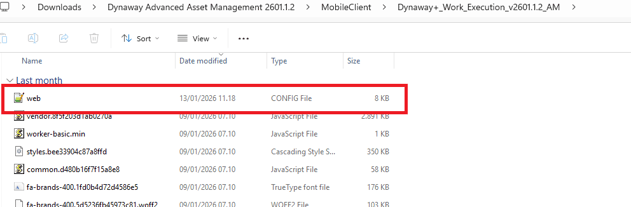
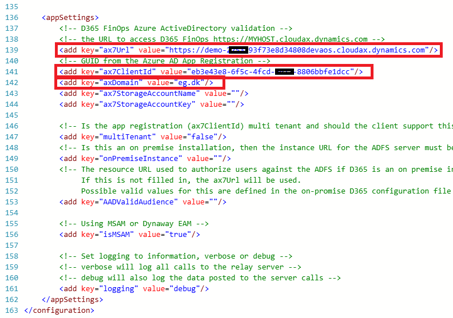
This is the file that must be configured before uploading. (The appSettings section is at the bottom of the script)
Before changes:
<appSettings>
<!-- D365 FinOps Azure ActiveDirectory validation -->
<!-- the URL to access D365 FinOps https://MYHOST.cloudax.dynamics.com -->
<add key="ax7Url" value="<AUTH_SCOPE_BASE_HREF>"/>
<!-- GUID from the Azure AD App Registration -->
<add key="ax7ClientId" value="<AUTH_CLIENT_ID>"/>
<add key="axDomain" value="<AUTH_AUTHORITY>"/>
<add key="ax7StorageAccountName" value=""/>
<add key="ax7StorageAccountKey" value=""/>
After changes:
<appSettings>
<!-- D365 FinOps Azure ActiveDirectory validation -->
<!-- the URL to access D365 FinOps https://MYHOST.cloudax.dynamics.com -->
<add key="ax7Url" value="https://demo-test.cloudax.dynamics.com"/>
<!-- GUID from the Azure AD App Registration -->
<add key="ax7ClientId" value="eb3e43e8-6f5c-4fcd-xxxx-8806bbfe1dcc"/>
<add key="axDomain" value="eg.dk"/>
<add key="ax7StorageAccountName" value=""/>
<add key="ax7StorageAccountKey" value=""/>
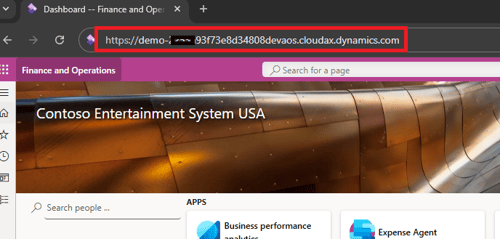
ax7Url -
<add key="ax7Url" value="https://contoso-test.sandbox.operations.dynamics.com" /> -
The URL for the Dynamics 365 for Finance and Operations environment.
ax7ClientId -
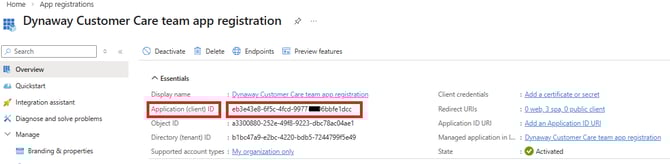
<add key="ax7ClientId" value="b097fac0-deae-4959-9791-53bcb40a9909" /> -
This ID is the application ID of your App registration, and it can be found in the Azure portal by navigating
to Microsoft Azure Portal > Microsoft Entra ID > Manage > App registrations > Application ID.
axDomain -
<add key="axDomain" value="contoso.com" />
Define the Active Directory domain name for the users
who should be able to log in on the Mobile Client.
The configured appSettings section can be copied and used in all web.config files
For Work Execution and Scheduling Board.