Introduction
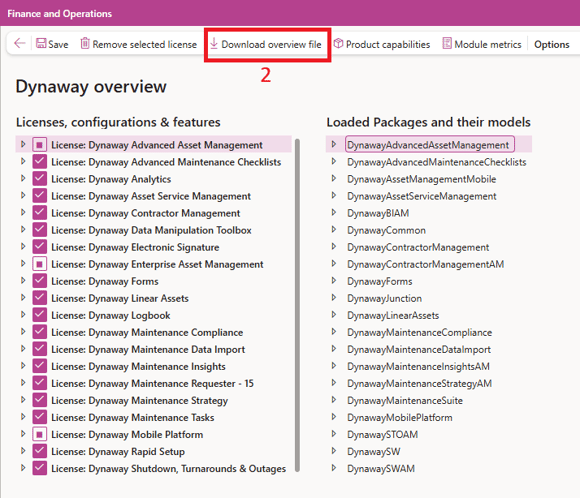
The Dynaway Overview page provides you with a centralized view of all Dynaway packages and models installed in the environment.
It also displays details on:
- Licenses imported into the environment.
- Configuration keys and their statuses (enabled/disabled).
- Features included in installed Dynaway packages.
This page simplifies license and feature management by offering a read-only interface to review settings without making direct modifications.
Viewing the Dynaway Overview Page
The Dynaway overview page can be accessed from the following locations based on your user role:
- General Access (For all customers)
- System administration > Setup > License configuration > Dynaway overview
- Asset management (AM) customers
- Asset management > Setup > Module metrics > Dynaway overview
- Dynaway mobile > Setup > Module metrics > Dynaway overview
- Enterprise asset management (EAM) customers
- Enterprise asset management > Setup > Enterprise asset management parameters > License and configuration > Dynaway overview
- Enterprise asset management > Setup > Module metrics > Dynaway overview
- Internal Dynaway usage
- Dynaway utility tools > Dynaway overview
- Dynaway utility tools > Module metrics > Dynaway overview
- Dynaway utility tools > Product capabilities > Dynaway overview
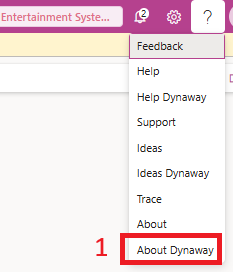
1. Click About Dynaway
2. Click Download overview file
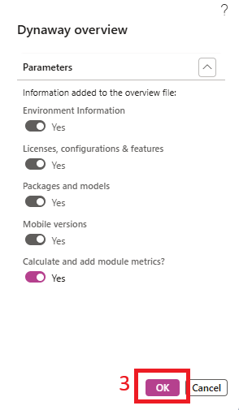
3. Click [OK]
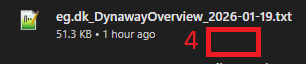
4. Attach this file